Pattern Provider Status Controller

The Pattern Provider Status Controller is a central control unit that allows you to manage the working modes of all pattern providers in your network through a single unified interface.
User Interface & Operations
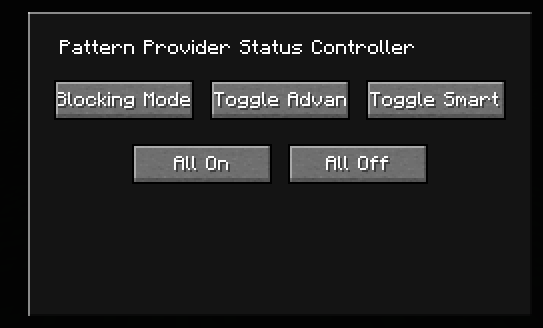
The controller UI provides the following control options:
Mode Switching
- Toggle Blocking Mode: Globally enable or disable "Blocking Mode" for all pattern providers.
- Toggle Advanced Blocking: Globally switch "Advanced Blocking Mode."
- Toggle Smart Multiplication: Globally enable or disable the "Smart Multiplication" feature.
Batch Operations
- Enable All: One-click to enable all three features for every pattern provider in the network.
- Disable All: One-click to disable all three features for every pattern provider in the network.
How to Use
- Place the Pattern Provider Status Controller in your ME network.
- Right-click the controller to open the configuration interface.
- Click the corresponding buttons to adjust the status of all pattern providers globally according to your management needs.
Note: This controller affects all pattern providers in the network. To configure individual providers separately, you must still use the UI of each provider.