
Hauling items around by hand may be all right for some people, but we are a Sanguimancer. What's more, we have access to Demon Will! Surely there's a better way to go about things.
As such, you've managed to come up with Routing Nodes. These offer a powerful way to transport, sort, and filter items, sending them magically through the air as you decree.
Routing Node Networks have 3 main components: Input Nodes, Output Nodes, and the Master Routing Node.
Every network requires exactly 1 Master Routing Node, and every other Node in the network must be able to trace a route back to the Master, whether directly, or via other Nodes.
Input and Output nodes can withdraw or insert items from any block with an accessible inventory, respectively.


The Master Node will be able to accept upgrades in the future, but for now it only serves to control and direct the network, acting as its 'Brain'.
A Master Routing Node is all well and good, but without the other two node types, it's not particularly useful on its own, so let's get on to those next.
Input Routing Nodes draw items in to the network, Output Routing Nodes export them out again, and plain old Routing Nodes serve to extend the reach of your network. As Input and Output nodes are currently otherwise identical, we will be focusing on the Input Routing Node unless otherwise specified.


Doesn't do a whole lot on its own, but can be used to extend Routing Networks beyond the 16-block reach of a single connection.
When you place an Input or Output Node down, it will automatically connect to all adjacent inventories, but it won't do anything without a Filter of some kind in at least one of its side's slots. For example, you could use a Standard Item Filter set to Iron Ore on top of a Furnace, a second filter set to coal on the side of the furnace, and an Input Node underneath set to Iron Ingots.
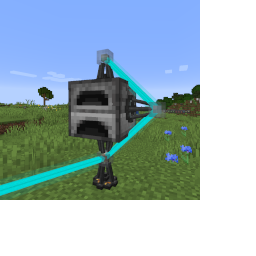
An Output Node in-world.
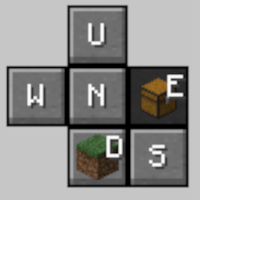
Once we've got our nodes set up, let's open up the Node GUI.
Over on the right, we have our cardinal directions - Down, Up, North, South, West, and East. You'll notice that a little picture of a block appears on some buttons, representing what's on that side of the node. The GUI will open up on the side facing an attached inventory, or Down if no inventory is present. The buttons themselves follow the direction the player is facing, so the top button is 'forwards', the left button is 'left', etcetera.
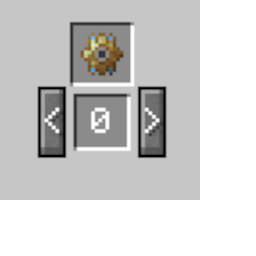
Over on the left, you'll see a space for us to insert a Filter for the selected side, and a Priority. bigger numbers = more important.
Nodes can have one filter per side - so we'll select the side we want, and put our filter in it. (For more information on Filters, see 'A Primer On Filters')
Once your Input and Output Nodes have been set up, have been linked together with the help of a Node Router in a network that includes exactly one a Master Routing Node, and both have item filters inserted to the correct sides, you should be good to go! Items will be routed according to the priorities and the rules contained within your filters.
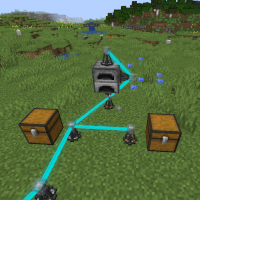
Nodes do not have to be linked directly to the Master Routing Node, merely to any node on the network.