
Spellcrafting looks complex from a distance, but gets very easy when doing it more often.
You start by crafting an Occulus, placing it down and opening it. Through the Occulus, you can unlock new skills. Skills come in four categories, more on that in a minute.
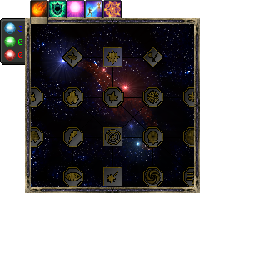
The Occulus has five tabs, the first four of which are skill tree tabs.
Shapes
The first category of skills, shapes, determine how the spell is cast. For example, Self means that the spell is cast onto yourself, while Projectile shoots a projectile that casts the spell on whatever it hits.
Shapes have a square outline in the Occulus.
Components
The second skill category, the components, represent what the spell does. For instance, Physical Damage acts as if the spell hit the target with a sword, while Dig breaks the targeted block. Some components only affect blocks, some only affect mobs, some affect both, and very few affect neither, instead doing something else entirely.
Components have an octagonal outline in the Occulus.
Modifiers
Next up, modifiers. Modifiers can affect both shapes and components, but not every combination will turn out to actually have an effect (what sense would Fire Damage + Gravity make?) The book tells you most, but not all useful combinations.
Modifiers have a rotated square outline in the Occulus.
Talents
And finally, talents. Talents are not regular spell parts, instead, they are permanent unlockables that boost the player's capability to perform magic in different ways.
Talents have an octagonal shape, like components. They can be distinguished from them by looking at the tab: All talents are in the Occulus's Talents tab, and all octagonal parts in the Talents tab are talent skills.
Affinities
A word should also go to the Affinity tab of the Occulus. This tab displays your affinity depths. It would be too complex to explain this here, so for further reading, please consult the affinity chapter.
Now that you have learned some skills in the Occulus, it is time for the next step: the Inscription Table. The Inscription Table is where you will assemble your spells. Since this can be complex for novices, have a quick breakdown of the different areas of the GUI, top to bottom:
- The Source Area contains all skills you currently know.
- The Search bar can be used to search skills by name.
- A slot that takes in a Book & Quill. The spell recipe will be written onto this book.
- A Clear button that will move all skills back to the Source Area.
- A total of five brown squares, the so-called Shape Group areas. You can drag shapes and modifiers here. For the beginning, you should only be using the first one.
- The Spell Grammar section. This is where components and component-related modifiers go.
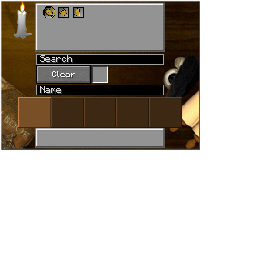
The name bar can be used to name your spell recipe, this is not required though.
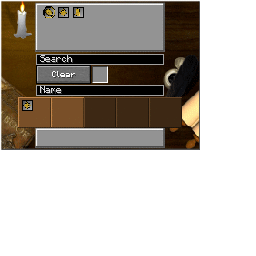
Drag the skills down to the shape groups and the spell grammar section.
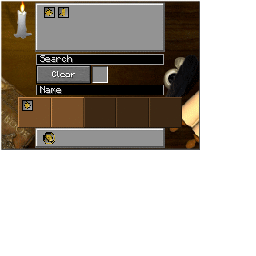
The shown spell recipe is Projectile-Dig, which is recommended for beginners.
Note that not every combination is allowed in the Inscription Table. Do not worry, though, since you will notice soon enough that you are trying to do something that is not permitted.
Once you are done, simply take out the book. To get back the book without writing the spell recipe, instead shift-move the book out of the table.
Now that you have your spell recipe, you can do the final step: crafting the spell at the Crafting Altar. Please refer to its section to find out how to construct it.
To start crafting the spell, put the recipe onto the altar's lectern. The items you need to throw in will appear above it, always starting with a Blank Rune and ending with a Spell Parchment.
When first using the spell, you must choose an icon and a name for the spell. After that, you are done! It is heavily recommended to at least read the other chapters in this category, as they cover most things to know in magic.
Happy spellcasting!