
Modules/$ are inserted into an Modular Router/$ and tell the router what to do. There are 20 different module types, each of which has a specific function. All modules have some characteristics in common, however:
• All modules have 9 filter slots/$ to control which item(s) a module will process.
• Many modules have a defined direction/$, relative to the router's facing.
• Some modules have extra settings for configuring module-specific functionality.
All this can be configured in the module's GUI, which you can access by Right-Clicking/$ the module in hand.
You can also configure an installed module in a router GUI by pressing [modularrouters.configure]/$ while hovering over it, or Middle-Clicking/$ the module in the GUI, without needing to remove it from the router.
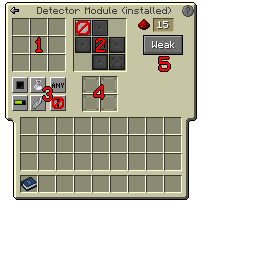
Module GUI: see following pages for a description of each part of the GUI/$
1. Filter Slots
There are nine filter slots, where you can insert ghost copies of any item or block. The module will only operate if the item in the router's buffer/$ matches an item in the module's filter (if whitelisting; the opposite if blacklisting).
2. Direction Selector
Most modules operate in a defined direction, relative to the router's facing. Here you can define the direction.
Some modules (e.g. the Sender Mk2/$) target a distant block directly, so do not have a definable direction. In this case, the direction selector will be blank.
3. Filter Control
Here there are several buttons which control:
• Whitelisting vs. blacklisting
• Whether to match item damage (for items with durability)
• Whether to match item NBT, e.g. enchantments
• Whether to match by item tags/$
There is also a button here to control Termination Behaviour/$, which is explained in a separate page.
4. Augments
Every module has four Augment/$ slots where augments (module-specific upgrades) can be inserted.
The Augments which may be inserted here depend on the module type; not every module type accepts every augment type.
5. Extra Settings
Some modules have some extra configuration options. For example, the Detector Module/$ shown earlier has options to set the redstone output level, and whether the output signal should be a weak or strong redstone signal.
Where modules have such options, they're shown on the right-hand side of the GUI.