
Quantum Crafter
The Quantum Crafter is a powerful and configurable auto-crafter. With the entire inventory of the AE systems at its grasp, crafting non-stop becomes a trivial task. It is capable of running crafting jobs at a very fast pace while making sure you never run out of crucial resources. It is also capable of running fluid substitution crafts as well as recursive crafts, which have an input as an output.
Using the Crafter
To make use of the Quantum Crafter, you need to place it into your network and connect it with a cable. A single channel is required for operation. Select which recipes you want to be run indefinitely and encode them in a crafting pattern. Those patterns can be inserted in the appropriate slots in the crafter.
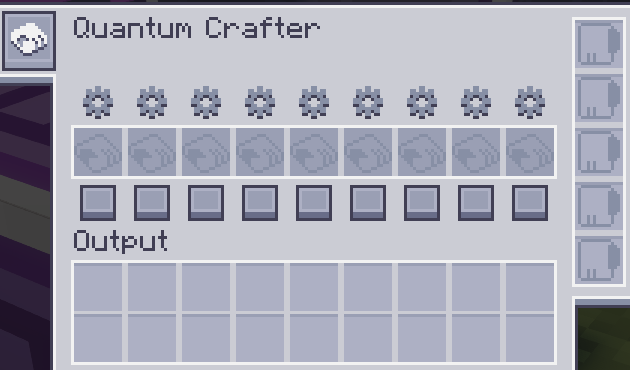
Once inserted, there are two buttons that allow for configuration of each pattern. The square button on the bottom is responsible for enabling/disabling a pattern. Disabled patterns will never be crafted, but enabled patterns still follow a set of conditions. To set these conditions, you need to click the cog button to open the Pattern Configuration UI.
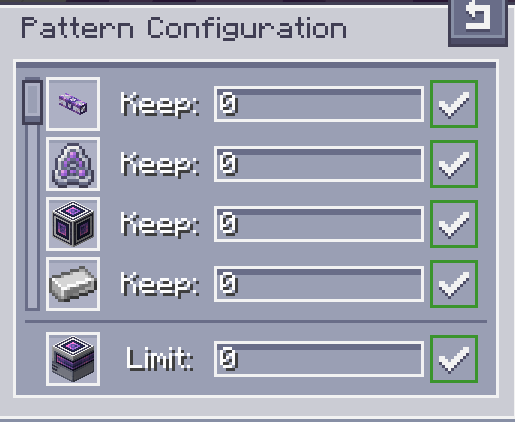
Inside the pattern configuration UI, all ingredients and the primary output are listed. You can use the number inputs to regulate how much of each ingredient you want to keep inside the ME system at all times, as well as set a maximum amount of the end product, to avoid over-crafting expensive items. After typing the desired number (which also accepts mathematical expressions), you need to press enter to apply the input. An indication on the right will make it clear if values were applied or not. Particularly while configuring the output limit, if the value is set to 0 the limit is removed and the crafting will continue until inputs run out.
Outputs
The output of the crafts performed by the quantum crafter are highly configurable. The default configuration will try to push items directly from the output slots to the ME system. By left-clicking the cell button on the left toolbar, the output can be set to be pushed into adjacent inventories instead. This is further configurable by clicking the other button that appears when this setting is enabled, that allows for the selection of which sides will be considered enabled for auto-export. The combination of these two configurations should allow for plenty of control and creative choice on how the crafter is used.
Upgrades
To unlock the full potential out of the Quantum Crafter, upgrade cards must be installed. It can receive
 Карта ускоренияs and
  Редстоуновая картаs. The former greatly accelerates the crafting
speed, reaching 64 crafts of each pattern per tick while the latter allows for redstone control.
Редстоуновая картаs. The former greatly accelerates the crafting
speed, reaching 64 crafts of each pattern per tick while the latter allows for redstone control.